
What to do when your computer no longer does what you want?
Useful tips for when things go wrong!


Liquid spilled
It happens quickly: one careless movement and coffee or cola is spilled over the keyboard! What to do?
1) Open the device fully and turn it upside down immediately so no liquid reaches the circuit board.
2) Unplug the power cable and remove the battery. If the device was switched on, do not shut it down properly first – every second counts!
3) Pat the keyboard dry with kitchen roll or tissues.
4) Do not switch the device back on, as liquid may still be inside even after several days of drying, which can cause short circuits and total failure. -> Consult an expert.
With a bit of luck, quick action will prevent any internal damage. However, the keyboard is usually unusable after liquid ingress, as the key contacts often stick and either work poorly or not at all. Intensive cleaning with distilled water rarely succeeds. A replacement keyboard costs between 30 and 80 EUR depending on the device and manufacturer.

Graphic errors or no display
Increasingly common in laptops: after switching on, the screen shows stripes, blocks or other strange patterns, but you can hear the system starting (e.g. Windows startup sound). It can also happen that nothing is visible at all, or the computer only beeps.
With this type of fault, options are limited once the warranty has expired. The graphics card and/or other parts of the motherboard are having trouble displaying graphics correctly. The only solution is a costly replacement of the motherboard or repair of the graphics unit (approx. 200 EUR).
The cause of these faults is often overheating. Unlike a desktop PC with its large case, a laptop has only a small fan to expel heat from the processor and graphics card. Over time, the fan and heat sinks become clogged with dust and fluff, causing a heat build-up that inevitably brings the system to its knees. Regular crashes and extremely slow response are the milder symptoms – more often the solder joints of chips come loose, resulting in the graphic errors and total failures described above. So never place laptops on tablecloths or cushions that block the air intakes, and bring them in for cleaning every two years at the latest!
Viruses, Trojans & Co.
It happens more and more often: you click the wrong link or install a "plugin" and suddenly strange things start happening on your PC – speed drops rapidly, advertising windows pop up as if by magic, or nothing works at all. Virus alert!
First measure: disconnect the device from the internet – unplug the cable to the modem or disconnect WiFi – to prevent further malware from downloading. Switch off the computer, obtain several antivirus CDs, boot from them and fight the viruses. Then start the system normally, install another antivirus program and scan again. Change all passwords and banking access data!
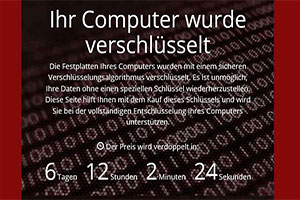
The creators of malware pursue many different goals – none of them noble. These range from causing simple chaos and misusing your PC for attacks on company servers, to data theft and blackmail. The image on the left shows a so-called "ransomware Trojan". It encrypts all personal files and demands a sum of money for decryption (usually in Bitcoin). Whether the decryption key is actually provided after payment is very uncertain, and the police strongly advise against paying anything!
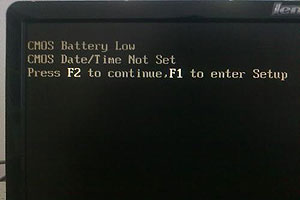
CMOS Battery Low
This error message usually only appears on older devices immediately after switching on. As a rule, the device still starts up normally, but the date and time are no longer correct.
No need to panic – nothing else is wrong with the device. A small button-cell battery (not the main battery) is simply flat or faulty. Unfortunately this battery cannot be replaced by the user themselves, as it is built into the circuit board and the case must be opened to access it.
The purpose of this battery is to retain important system settings when the PC is switched off, not connected to mains power, and has no battery inserted (for laptops).


